


If you are receiving an electronic certified translation from Poland for the first time, you may be wondering what exactly to do with the file. Can you send it by email? How do you check whether the electronic signature is valid? Can you use the same translation more than once?
Using an electronic certified translation is straightforward if you remember one key rule: keep the original file received from the sworn translator, do not edit it, and submit it electronically using the method specified by the receiving institution.
What file format does an electronic certified translation come in?
An electronic certified translation is issued as an electronic document, usually a PDF file. It is not a scan of a paper translation or a document with a scanned signature simply inserted into it.
The document bears the sworn translator’s qualified electronic signature. This is the electronic equivalent of the handwritten signature used to certify a paper sworn translation in Poland. It allows the recipient to verify who signed the document and whether the file has been altered since it was signed.
The signature itself can use different technical formats, the most common being PAdES and XAdES.
PAdES is used with PDF files. The signature is embedded in the document, so the recipient receives a single file containing both the translation and the signature data. This type of document can be verified in Adobe Acrobat Reader, as explained below.
XAdES can be used with various file types and is commonly encountered in electronic documents and official procedures, particularly those based on XML files. It is much less common in certified translations. Unlike PAdES, the signature does not have to be embedded in the document, so you may receive the translation and the signature as separate files. If so, keep and submit both files together. The signature can be verified using suitable software or an online service such as the Polish government service podpis.gov.pl.
How can I check whether the electronic signature is valid?
For a PDF file, the easiest way to check the signature is to open the document in Adobe Acrobat Reader. The free version allows you to verify the electronic signature and view information about the certificate used to sign the document. Basic information about the signature appears when you open the file, with further details available in the Signature Panel.
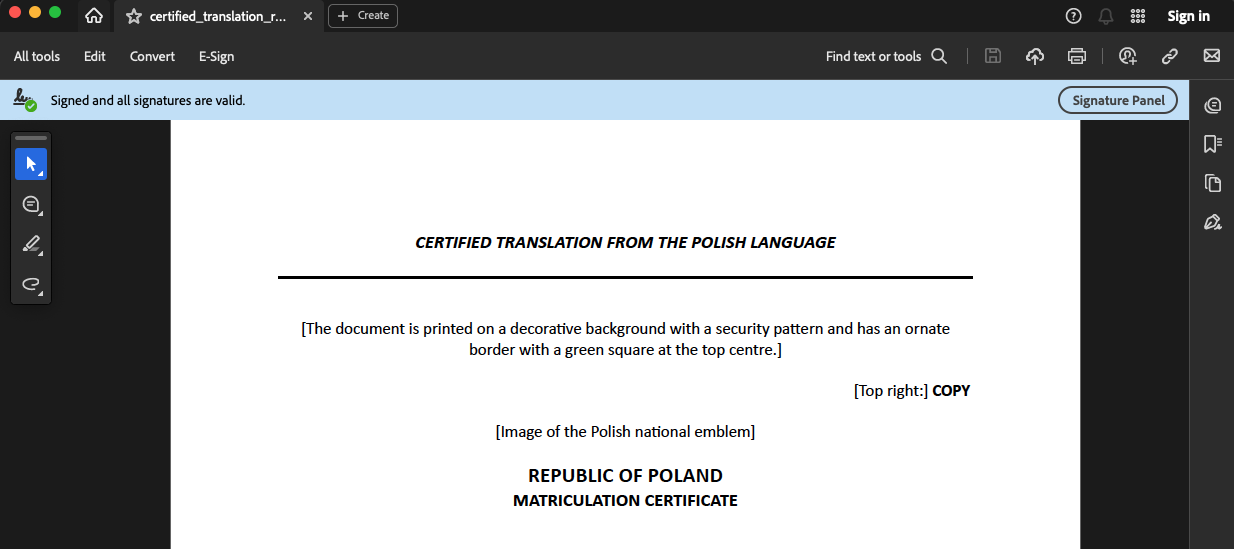
If the document has been signed correctly and has not been altered since it was signed, Acrobat Reader should indicate that the signature is valid.
Some web browsers, mobile apps and basic document viewers do not display electronic signature information. This does not mean that the file is unsigned. You do not need to verify the signature yourself before using the translation — you can simply send the original file you received from the translator to the intended recipient.
Submitting an electronic translation to an institution
An electronic certified translation should be submitted in the original format in which you received it from the translator, without changing its contents or file format. This allows the recipient to verify the electronic signature and confirm that the document has not been altered. How you submit the file depends on the institution’s requirements. This may be by email, through an online document submission system or, when dealing with a public authority in Poland, via e-Doręczenia. If the institution accepts documents by email, simply attach the file to your message.
Many people wonder whether they need to print an electronic translation. You do not — and if you are sending it to a public authority or other institution, it is usually better not to. A printout can be useful for your own reference, but the qualified electronic signature can only be verified in the original electronic file.
If the institution requires a paper certified translation, you should order one directly from the sworn translator. The translator will prepare a paper copy, sign it and affix their official seal.
Renaming, editing and reusing the file
You can rename a PDF file without affecting the validity of its qualified electronic signature. However, you should not edit the contents of the document. Changing the text, adding or removing elements, or even saving the file after making and then undoing changes may cause the electronic signature to become invalid.
If this happens, there is no need to worry — simply download the original file from your email again.
One of the main advantages of an electronic certified translation is that it can be used more than once. The same original file can be submitted to another institution, provided that it accepts translations in electronic form.
With a paper certified translation, an institution may require you to submit the original paper copy. If you also need to use the translation elsewhere, you may therefore have to order an additional certified copy from the sworn translator for an extra fee.
Storing the file and dealing with signature verification issues
An electronic certified translation should be stored in the same way as any other important document. Keep the original file in a secure location on your computer and make a backup, for example in secure cloud storage or on an external drive.
If an institution cannot see the signature or is unable to verify it, the problem is often with the way the document is being opened rather than with the signature itself. First, make sure that the institution has received the original file in the format provided by the translator. You can then ask the recipient to open it using software that supports electronic signature verification, such as Adobe Acrobat Reader.
If the signature still cannot be verified, or if you can no longer find the original file, contact the translator. Whether the document can be sent to you again may depend on how long ago the translation was completed and the translator’s file retention policy.
Submitting translations in Poland via e-Doręczenia
If you are submitting your translation to a public authority in Poland, you may come across e-Doręczenia, Poland’s official electronic registered delivery system. You can use it to submit an electronic certified translation where the relevant procedure allows this.
Since 1 January 2026, e-Doręczenia has been the primary channel for electronic communication between Polish public authorities and individuals and businesses, unless the rules governing a particular procedure specify a different method of service. The system is the electronic equivalent of registered post with proof of receipt and allows correspondence to be delivered with legal effect.
TextLab support after your translation is complete
If you have any questions after receiving your translation about the electronic signature, opening the file or using the document, we will be happy to help explain the technical aspects.
CONTACT USNotice: This article is for general information only and does not constitute legal advice or an individual recommendation. Before making any decision, check the current law, the requirements of the relevant institution and the specific circumstances of your case.